Local SEO in 2026: how to enter the Google map pack and stay there
Local SEO step by step: three map ranking factors, Google Business Profile, consistent NAP, reviews and a 12-week plan for reaching the top three.
Local SEO: what the map pack is and why it determines phone calls
Local SEO is a contest for three places. Search on your phone for “plumber Białystok” or “dentist near me” and look at the results: ads first, then a map with three businesses, followed by ordinary organic results. Those three map listings form the local pack. For a service business with a physical address, that is Google’s first page. Everything below is page two.
In practice, someone who needs a service now and nearby does not read ten descriptions. They tap the best-rated card, check the hours and press Call. The journey takes a dozen or so seconds and ends with a phone call, not a website visit. That is why a renovation business, garage or law firm can have an excellent website and still get no enquiries if its map profile is empty.
On mobile, the map pack fills the first screen. Your website can rank fifth organically, but if you are absent from those three map cards, you effectively do not exist for a local customer.
Another fact small-business owners often miss: maps and organic results use separate algorithms. Your website can rise for “apartment renovation Białystok” while the map profile stands still, because the profile depends on category, distance and reviews, not the page’s content. The reverse happens too. These systems support each other but do not replace each other.
This article covers work on the first system. I do not explain again what SEO is and how search engines work, or cover DIY website SEO: our step-by-step website SEO guide handles that. Here you get specific Business Profile fields, character limits, the order to work through them and a 12-week schedule.
Honestly, most tasks on this list can be done in two evenings. Not all results arrive quickly. Some depend on the number of competitors within a kilometre, and one factor cannot be overcome at all. Let us start there.
Read onHow Google orders map results: three factors
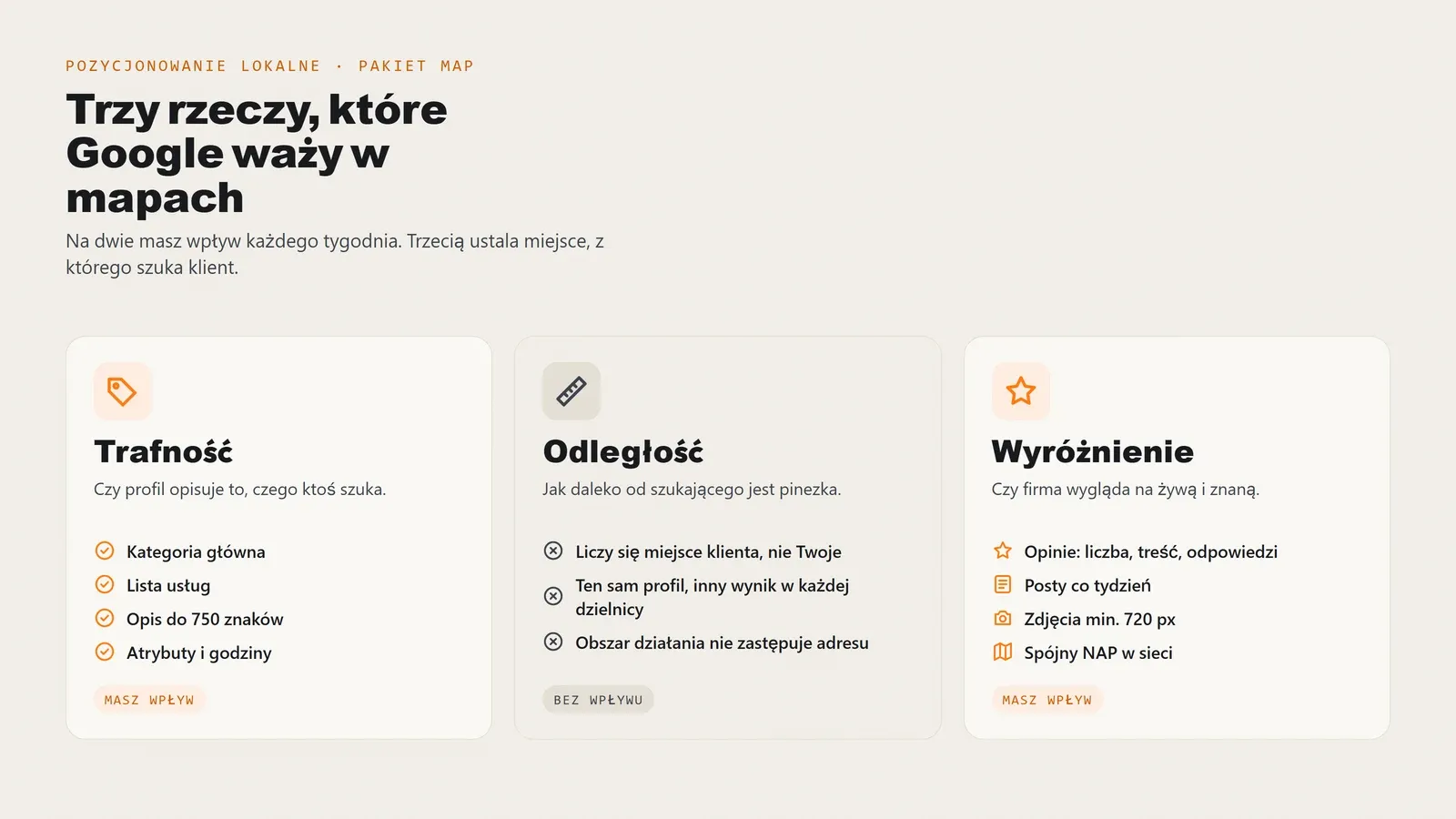
Google does not hide the basis of local rankings. Its official documentation lists relevance, distance and prominence. They sound simple until you realise each requires completely different work and one is non-negotiable.
Relevance: do you match the query at all?
Relevance measures how well the profile matches the search. Google primarily reads the main category, service list, attributes and business description. If you run a body shop but use the general Auto repair shop category, you lose searches for bodywork and painting to a precisely categorised competitor, even with twenty years doing the same work.
This is the cheapest factor to improve. One category change can affect visibility within a week and costs three clicks in the dashboard.
Distance: the factor you cannot change
Google measures the distance between the searcher and your pin. If someone searches for a hairdresser two kilometres from your salon while a competitor is around the corner, comparable profiles mean the competitor wins. Full stop.
You do not relocate for SEO or lie about the address. A virtual office or flat where nobody receives customers is a standard reason for suspension. Accept distance as a condition and compensate through the other two factors. In practice, your map reach is an oval around your pin, not the whole city. A business in Bacieczki will not dominate central Białystok through the profile alone, but can win its neighbourhood and three neighbouring ones.
Prominence: how much Google knows about you beyond its dashboard
The third factor is least obvious and takes most work. Prominence combines signals showing that a business is real and active:
- Review quantity and quality, including whether and how quickly you reply.
- Profile activity: posts, recent photos, current hours and answers to users’ questions.
- Consistent information online: identical name, address and phone on the website, directories and social profiles.
- Mentions and links from local publications, chambers and industry organisations.
You cannot build prominence in a weekend: it takes time and repetition. But it is the one area where a small business can outperform a larger one. Chains rarely reply to reviews within a day; you can.
Google Business Profile step by step: field by field
Google Business Profile, formerly Google My Business, is managed at business.google.com or directly in search when signed into the owner account. Below are the fields in order, with mistakes we see in businesses requesting Google Business Profile SEO.
Business name: just the name, no additions
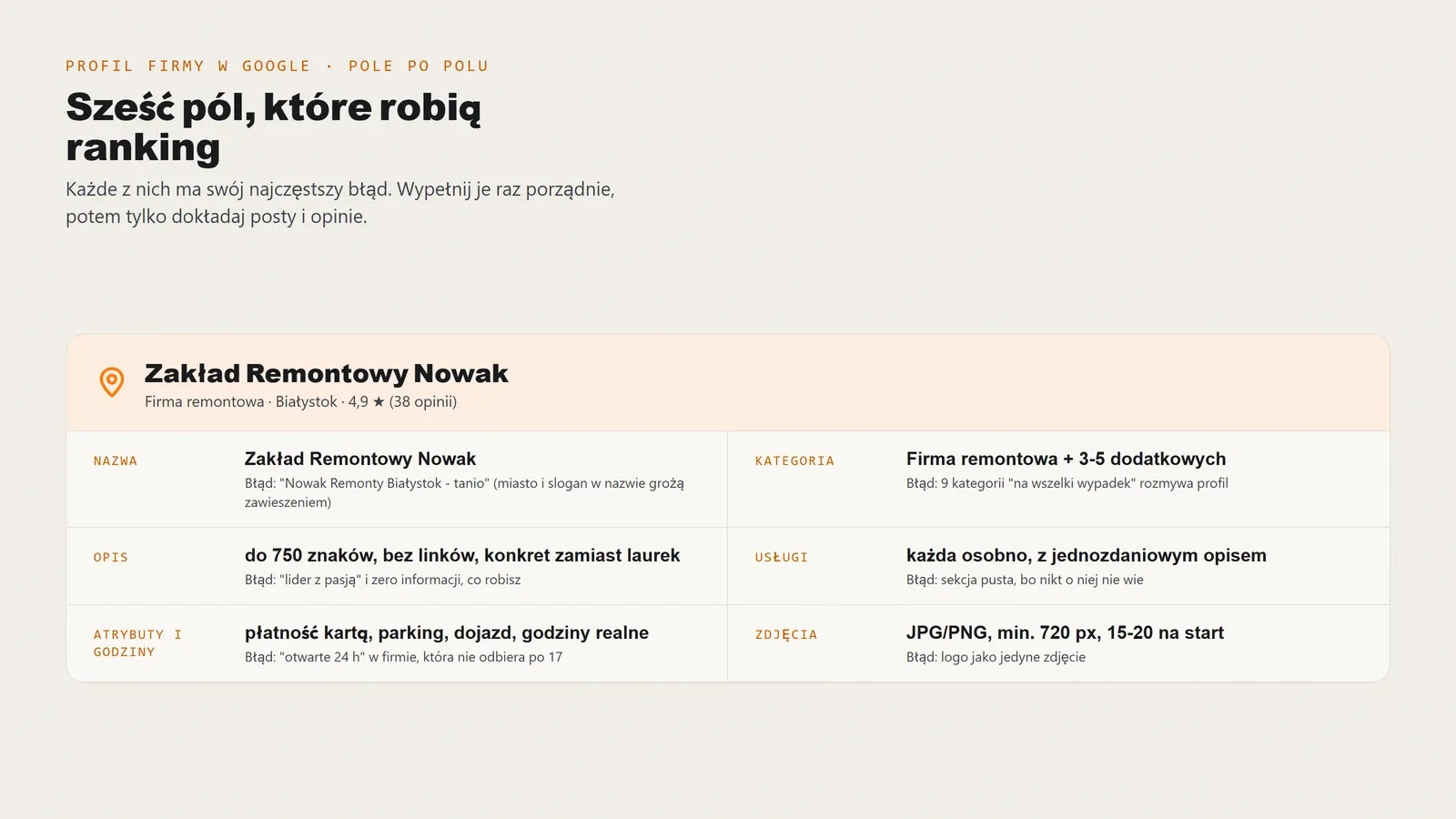
Use the exact business name shown on the sign, stamp and invoice. Nothing else. Google guidelines explicitly list three prohibited additions with examples: slogans such as “Your Bank - Poland’s friendliest bank”, location wording such as “KFC on Aleja Wolności”, and service wording such as “Orange 4G LTE”. The stated consequence is profile suspension.
This field is tempting because “Kowalski Renovations Białystok” looks like free SEO. It is not. The primary category carries the service signal, the address carries the city signal. The name need not and should not duplicate them, because that risks the whole profile. If your name currently has an addition, fix it before everything else. Name changes can trigger manual verification and are better handled separately.
Categories: one primary, three to five additional
The primary category is the strongest single switch in the profile. Choose it for your main revenue source, not your least frequent service. A clinic earning 80 per cent of revenue from implants chooses Dental surgeon rather than the general Dentist.
Google allows up to nine additional categories. Do not take nine. Each extra category dilutes the profile and attracts requests you do not handle; a rejected enquiry is a lost quality signal. Three to five is a sensible range, and only for work you actually accept.
Description: 750 characters, no links or empty praise
The description has a firm 750-character limit and does not accept links. Write for someone choosing between you and two other map cards. Be specific: what you do, for whom, where, how quickly you respond and starting prices. Local terms fit naturally into sentences about scope and service area, not a comma-separated list at the end.
Leave out unsupported adjectives, a company history starting in 1998 as the first sentence, and dated promotions that will be obsolete next month.
Services: a separate field with its own ranking role
The services section is under Edit profile → Services → Add service, and most small-business profiles leave it empty. That is a mistake: each service has a name and short description that Google matches to long-tail queries. A garage listing timing belt replacement, wheel alignment and computer diagnostics separately can match three different searches instead of one general term.
List every service you actually sell, one entry per service, each with a one-sentence description.
Attributes and hours: small details that filter results
Attributes include parking, wheelchair access, remote service, payment methods, languages and customer toilets. Users filter results by them, and Google treats them as part of relevance. Select only what is true: claiming parking when none exists earns a two-star review.
Update hours before every long weekend and holiday. Google supports special hours separately and clearly rewards profiles that set them. A customer arriving at locked doors on Good Friday can leave a mark for years.
Three fields, three common mistakes

Swipe across the screen
Field
What to enter
Most common mistake
The exact name from the sign and invoice, without additions.
Adding a city or service, such as “Kowalski Renovations Białystok”, violates guidelines and risks suspension.
One, matching the service with the largest revenue share.
A category too broad or nine extra ones “just in case”.
Up to 750 characters: scope, area, response time, price ranges.
Comma-separated keywords instead of sentences, or trying to paste a link.
Each service separately with a one-sentence description.
An empty section because nobody knows it exists.
Verified facts only: parking, accessibility, payments, remote service.
Selecting facilities that do not actually exist.
Actual hours plus special hours for holidays and leave.
Hours entered at profile creation, untouched for two years.
Google shows a pending review status after each change. That is normal; changes can take a few minutes to two days.
Photos and posts: technical requirements and publishing rhythm
A profile without photos looks like a business that closed last year. Two photos from four years ago look much the same. Photos and posts are the simplest proof of activity Google can measure and users can see.
Photos: format, size and quantity
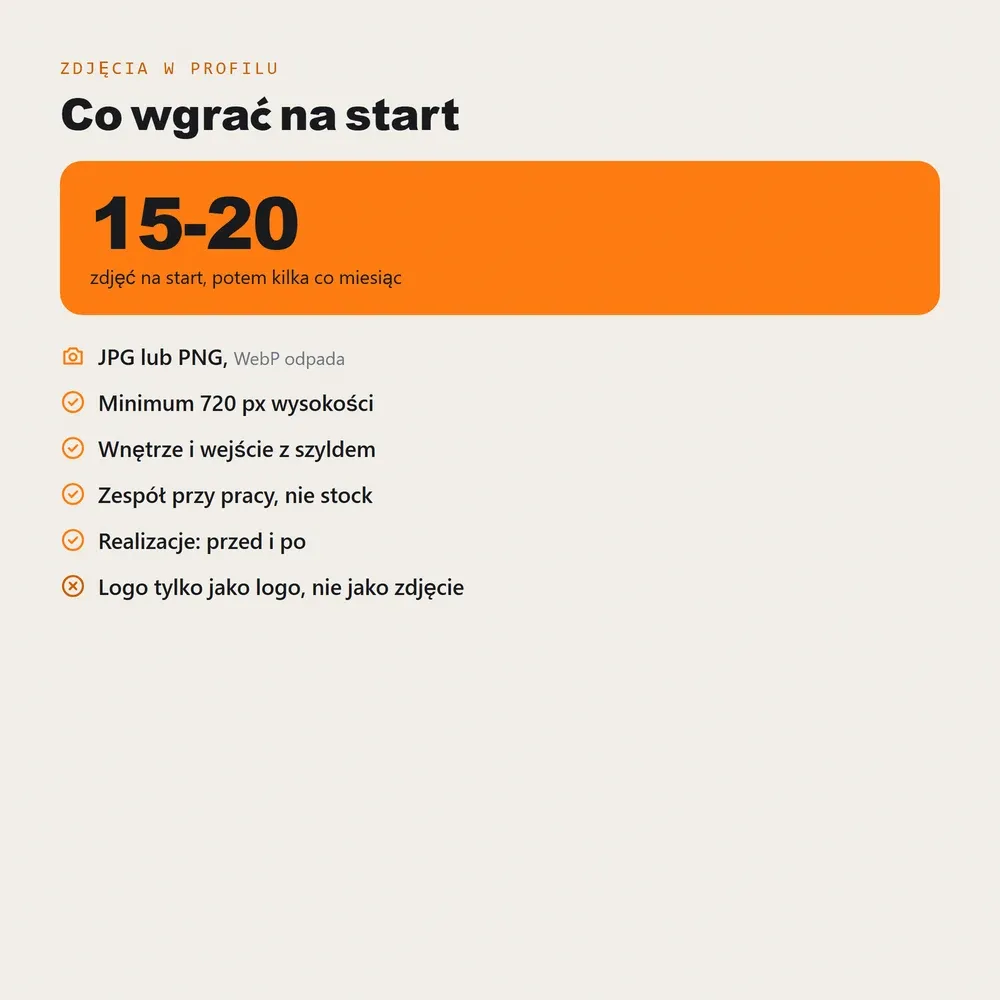
Google accepts JPG and PNG files at least 720 pixels high. WebP, now the default export from many website tools, does not go into the profile, so export a separate set. Start with 15-20 photos covering:
- Logo and cover photo - the two most frequently displayed files, deserving the most attention.
- Interior and entrance - customers should recognise the door they need.
- Team at work - real faces, not stock imagery.
- Finished work - a renovated bathroom, freshly painted car or clinic after replacing chairs.
- Equipment and materials - specifics distinguishing you from a competitor in the same category.
Two things hurt: stock photos and AI-generated graphics. Google can detect and remove them, and repeated use can trigger scrutiny of the whole profile. A phone from the last three years and daylight are enough.
Posts: at least once a week
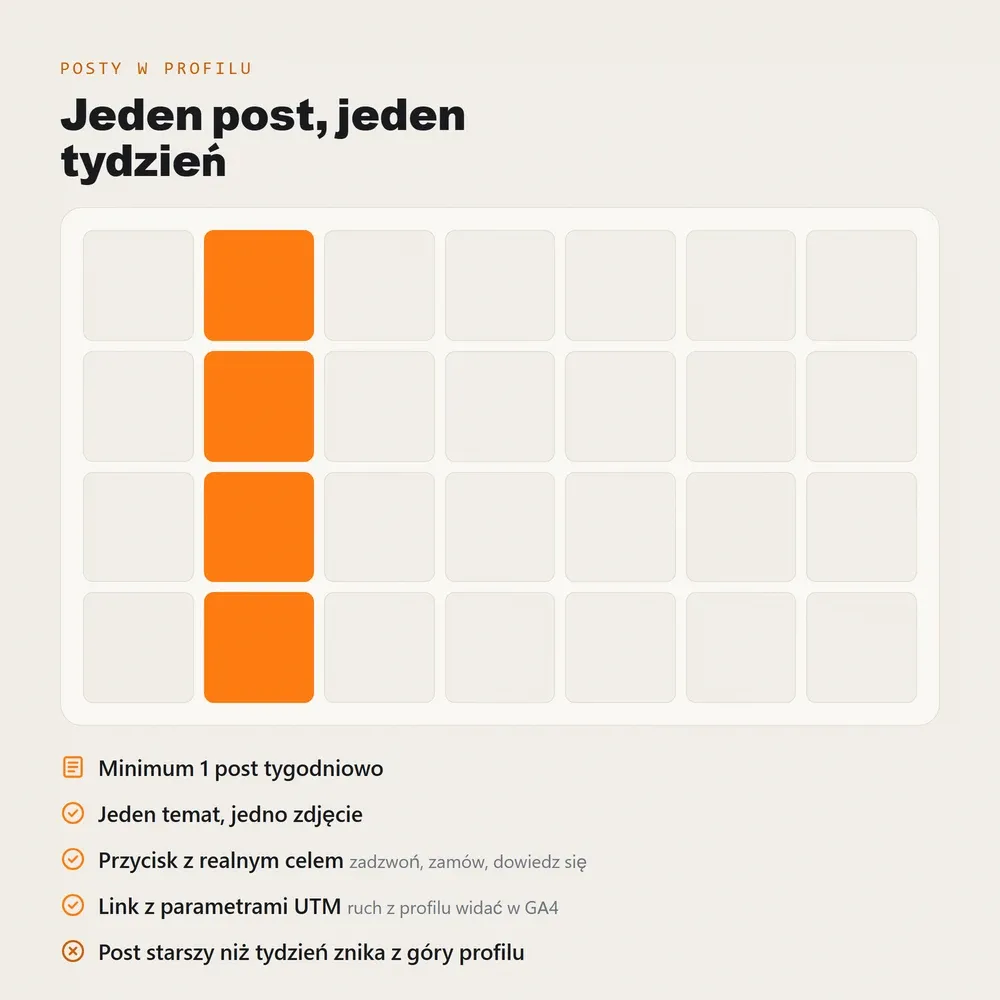
Business Profile posts have a short lifespan, so do not treat them like blog articles. One weekly post is the minimum for maintaining an activity signal. Rotate a recent project, a frequently asked question, availability, a seasonal service or a short notice about an open appointment.
Each post gets one photo, two to four sentences and an action button leading to a specific page, not the homepage. Add UTM parameters to links, for example utm_source=google&utm_medium=organic&utm_campaign=profil-firmy, to distinguish profile traffic from ordinary organic traffic in analytics.
Map reviews: how to collect them and reply
Reviews are the weightiest part of prominence and the one thing customers read on a card before deciding. Quantity, average rating, recency and owner replies all matter. A 4.7 profile with 60 reviews beats a 5.0 profile with three, because three reviews mean too little.
How to ask so people actually review
The most common mistake is waiting for customers to think of it themselves. Happy customers rarely do. A simple set works:
- A short review-form link generated in the profile dashboard and used consistently across channels.
- A printed QR code at the till, reception or handed over with the invoice.
- A text or email within 24 hours of completing the service, with one sentence and one link.
- A spoken request at handover when the customer says they are happy. This works best of the four.
Ask everyone, not only those whose rating you can predict. Filtering customers and sending the link only to satisfied ones is review gating, which Google treats as manipulation.
How to reply
Reply to every review, ideally within a day. For five stars, be brief and specific about what the customer wrote. For three or four, stay factual, ask for details and provide a contact channel. For one or two, leave emotion out: state the facts, offer contact and a solution. The next hundred customers, not just the reviewer, read your response to criticism to judge how you behave under pressure.
What is and is not allowed
Allowed
- Ask every customer for a review after the service, in person, by text or email.
- Share a short link and QR code to the review form in business materials.
- Send one reminder if the customer does not respond to the first request.
- Reply to every review, including negative ones, and request contact to clarify matters.
- Report rule-breaking reviews: abusive content, reviews by non-customers or competitors.
Not allowed
- Buy reviews in packages, a direct route to suspension.
- Review from fake accounts or ask family members who have not used the service.
- Offer discounts for positive ratings: material incentives violate Google guidelines.
- Filter customers and request reviews only from happy ones.
- Exchange reviews with a friendly business: Google detects reciprocal patterns.
One point about negative reviews: you cannot have them removed on demand unless they violate the rules. Google reviews reports slowly. Bringing in twenty new reviews after an old one-star rating is faster and more effective, because the average and recency then work for you.
NAP and citations: where to establish your business beyond maps
“Where should I do SEO?” has two valid meanings: where online the business needs to appear for local results to move, and whom to hire. This section answers the first; the last answers the second.
One consistent version
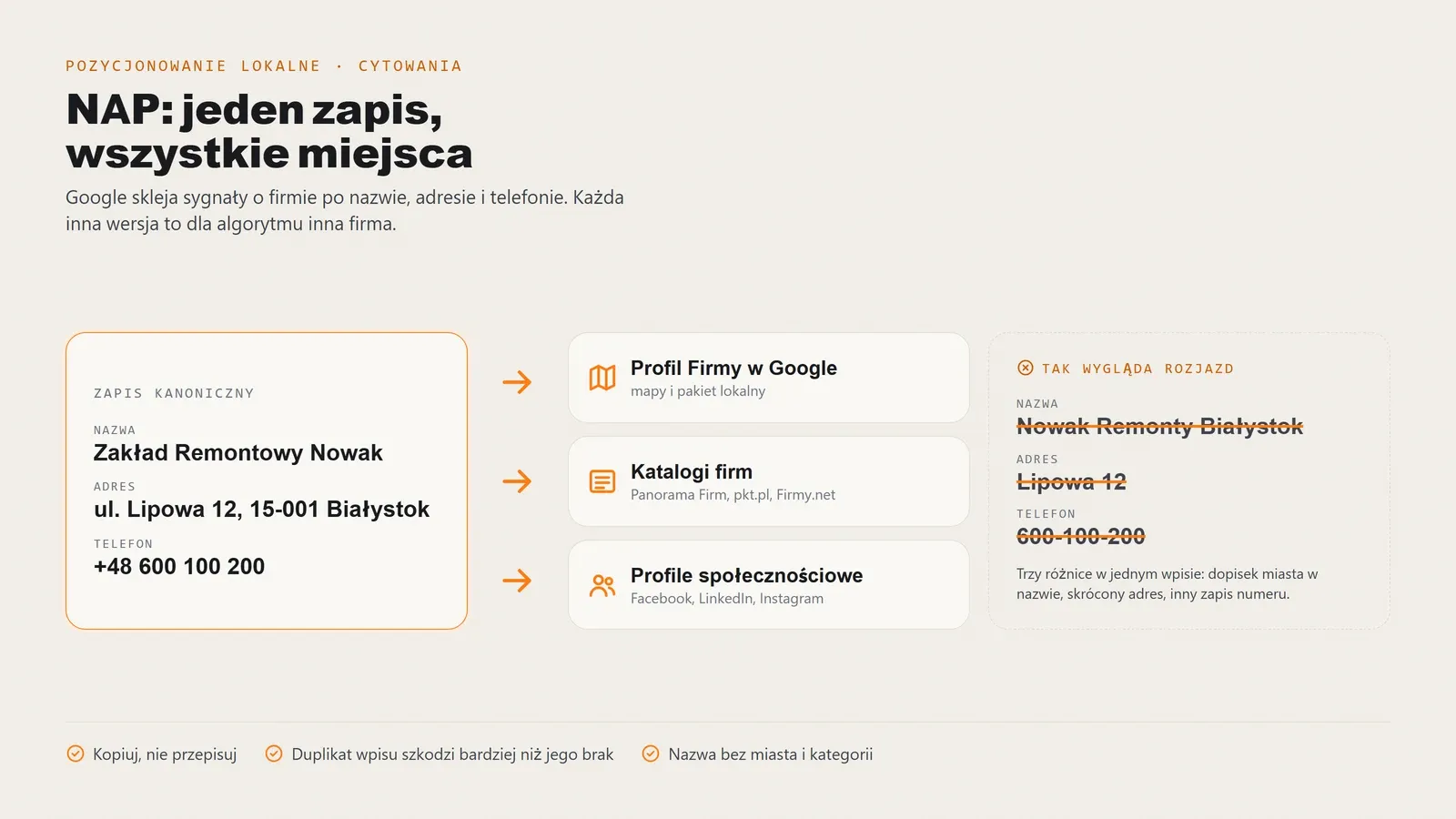
NAP stands for name, address and phone. The rule is simple: all three must match character for character everywhere they appear. One spelling, one format, no variants.
It sounds trivial until you check your own business. A typical mismatch: “ul. Wierzbowa 2” on the website, “Wierzbowa 2A” in a directory, an old mobile number on Facebook, the legal company suffix in one place and absent elsewhere. To Google, that signals uncertain business details, and an uncertain business does not earn a high map pack position.
Before distributing anything, save one canonical version in a file: exact name, full address and postcode, one phone number in one format, website address including its protocol. Copy only from there.
Where to list the business, in order
- Google Business Profile - the first priority, covered above.
- Bing Places and Apple Business Connect - two free listings serving Bing and iPhone maps. A local business gets real Apple Maps navigation traffic for a dozen or so minutes’ work.
- Polish national directories - Panorama Firm, pkt.pl, Firmy.net and Cylex. Free listings suffice; paid packages rarely pay back in SEO.
- Local and regional directories - city portals, chambers of commerce and local industry associations. These provide the strongest geographic signal here because the address appears in a city context.
- Social profiles - Facebook, LinkedIn and Instagram. Treat About sections as citations and enter the full NAP, not just a phone number.
- Industry portals - contractor databases, booking sites, law firm or clinic directories, depending on your work.
A duplicate hurts more than no listing
Search each service for your business before adding it. Many directories import public registers automatically, so a five-year-old listing may already exist. A second entry creates a duplicate and splits signals instead of strengthening them. One corrected entry beats two fresh ones.
A realistic local target is 15-20 consistent citations across two months. Save profile URLs in a spreadsheet with the date and login, or when you need to update a phone number next year, half will be impossible to find.
Your website and maps: what needs to match
The profile and website are two mutually supporting pillars of local SEO. Map traffic strengthens website behavioural signals, while a properly built site confirms what the profile says. Three things decide whether they speak with one voice.
A page for service plus city
The homepage cannot rank for every service at once. Each main service and city combination deserves a page: “air conditioning installation Białystok”, “divorce lawyer Białystok” or “timing belt replacement Białystok”. Include scope, price ranges, timing, examples, directions, contact details and a clear invitation to enquire.
One mistake breaks this faster than anything: cloning the same page for ten nearby towns and swapping city names. Google has recognised that pattern for years and treats it as low-value content. If you really serve several towns, make one good page per service and describe the service area in the text.
LocalBusiness schema with coordinates matching the pin
The website should contain LocalBusiness markup with name, address, phone, hours and coordinates. A quiet trap undermines results: coordinates in the website code may refer to a different point from the map profile pin. A two- or three-kilometre discrepancy gives Google conflicting location signals for queries whose value is entirely local.
It takes five minutes to check. Open the map profile, copy the pin coordinates and compare them with the code. If they differ, align the code to the pin, not the other way around.
Consistency to check every quarter
Footer phone number, contact-page hours, address in markup and directions, business name in the page title: all should match the profile. A common mistake is updating a phone number in the profile and contact page but leaving the old one in the footer and three directories.
If you do not know where the website falls short technically, an SEO audit provides a point-by-point diagnosis and repair list. Website work targeting local terms is covered by website SEO.
Special situations: no public address, several branches, suspended profile
These three cases come up more often than all the others combined.
A business without a public customer address: SAB
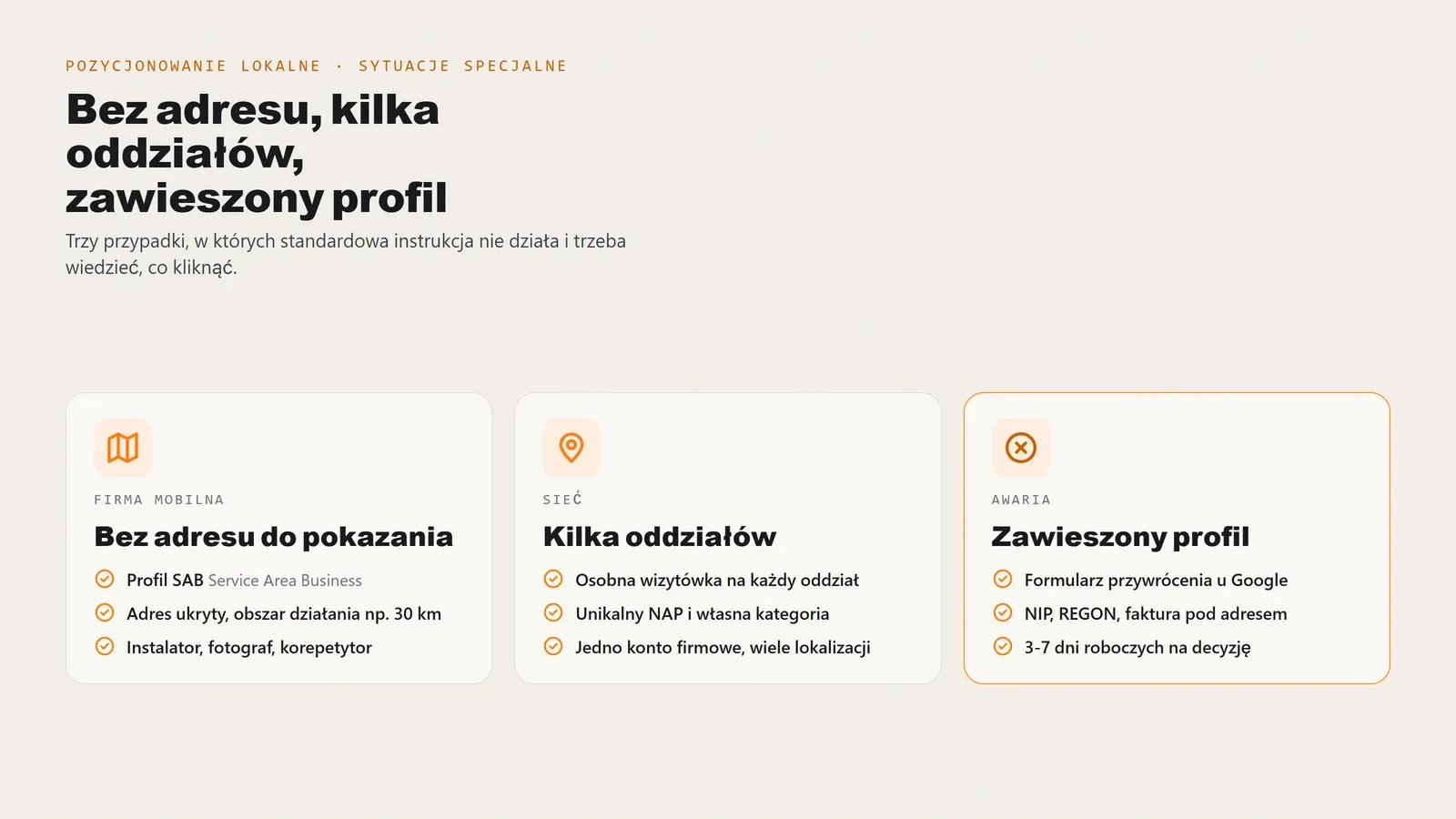
Installers, photographers, mobile computer repairers, tutors and renovation teams do not receive customers at their own address. Google provides a Service Area Business profile for them. Give the address for verification, hide it publicly, and set a service area as a list of towns or radius, for example 30 km around a city.
The trade-off is less control over distance, because Google chooses a reference point within the area. Compensate with reviews, a complete service list and profile activity. Do not use a virtual office or coworking address where you do not work. It is one of the most frequently detected suspension causes.
Several branches
Each branch with its own address and phone gets a profile. There is no one-profile-for-two-cities option because Google assigns results to locations, not brands. Each branch should have a distinct phone number, a category matching its actual work and a different description in the same tone.
Create a separate contact page for each branch, with its own LocalBusiness markup and coordinates. The map profile then links to its branch page rather than a shared contact page.
Suspended profile
Suspension removes the profile from maps and displays a policy violation message in the dashboard. Most people’s first reaction is to create a new profile. That is the worst move: the second gets suspended with the first and complicates the case.
Use this order instead:
- Remove the cause. Usually extra name wording, keywords in the name, a virtual office address or a category not matching actual activity.
- Gather documents. NIP and REGON, a utility or rental invoice for that address, sign and entrance photos, and a register entry.
- Submit the reinstatement form from the dashboard, briefly explaining what you corrected.
- Wait 3-7 working days. If refused, you can submit again with additional evidence.
How to measure results and how long they take
Local SEO has an advantage over national SEO: results appear sooner and are easier to measure concretely. You need not guess whether the profile works; Google shows it in the statistics.
Three data sources
Business Profile performance is the starting point. Watch four things: search views separately from map views; actions such as calls, directions and website visits; queries bringing people to the profile; and review count and average over time. Rising map views with steady search views are precisely the signal you want.
Search Console covers the second pillar, the website. Check impressions and clicks for city-based terms and whether service pages are indexed at all.
UTM parameters in profile links separate profile traffic from normal organic traffic in analytics. Without them, both go into one bucket and you cannot tell which channel produces enquiries.
Count phone enquiries separately. Local services get most contact by phone, so website forms alone reveal only a fraction of the picture.
A 12-week schedule
Swipe across the screen
Week
Action
What to expect
Verify the profile, correct the name, primary and additional categories, hours and attributes.
Some changes show as pending review. No movement in the numbers.
Write the 750-character description, complete services and add the first 15-20 JPG photos.
First photo views in statistics. The profile starts to look active.
Set canonical NAP, list in Bing Places and Apple Business Connect, plus four national directories.
Initial map view increases, usually 2-4 weeks after changes.
Local directories, social profiles and review requests through QR, text and email.
First new reviews. More Call actions in statistics.
A local website page, LocalBusiness schema and coordinates matching the pin.
The new page is indexed in Search Console. City-based website traffic starts more slowly than maps.
Weekly posts, all review replies within 24 hours and additional photos.
Map pack visibility for long-tail queries. Top-three appearances outside peak hours.
Review statistics, reach 15-20 citations and adjust categories using query data.
Stable local pack positions if the rhythm of posts and reviews continues.
This schedule assumes someone actually does the work. If weeks 9-12 fall out of rhythm, results do not vanish overnight, but the profile slowly returns to its starting point. Activity is a ranking factor, not a one-time checklist task.
What it costs, when to do it yourself and when to outsource
A quick note on costs, since the full ranges have a separate article. Google Business Profile setup and optimisation cost PLN 800 once, ready within 14 days. Monthly management, including posts, photos, review replies and map ranking monitoring, starts at PLN 500/month, without a fixed-term contract.
Broader local SEO for the website and profile together costs PLN 1,500/month with a minimum three-month agreement. The Start package, combining local SEO for up to five terms, one social platform, profile management and a monthly report, is PLN 1,900/month. See how much SEO costs for a breakdown and comparison of billing models, and our pricing for all rates.
When to do it yourself
If you have one address, one main service and an hour a week for the profile, do it yourself. Two evenings for the fields in section three, one for photos, then fifteen minutes weekly for a post and replies. That is a realistic plan for a garage, clinic or solo renovation business, and the cheapest local marketing available.
When outsourcing makes more sense
Outsourcing starts to make sense with several branches, a suspended profile, competitors holding 200 reviews each, or nobody able to maintain a publishing rhythm beyond a month. Another case is a business developing maps and the website together: work splits across two fronts and someone must keep their message consistent.
What to remember
- The map pack has three places. For local services, these matter more than the website’s organic ranking.
- Google considers relevance, distance and prominence. You cannot change distance, so work on the other two.
- The business name field is for the name alone. Adding a city or service risks suspension.
- The primary category is the strongest individual switch. Choose three to five additional categories, not nine.
- NAP must match character for character everywhere, and duplicate directory listings hurt more than missing ones.
- Ask for reviews; do not buy them. Reply to every review within 24 hours.
- Website coordinates must match the profile pin. A discrepancy of several kilometres gives conflicting signals.
What to do this week
- Open the profile and check three fields: name, primary category and services. All three changes fit into one evening.
- Save canonical NAP in one file and compare it with your website, Facebook and the first two directories in search.
- Generate a short review link and send it to your five most recent customers. After a week you will see how many responded and know what to expect from the next fifty.
FAQ: common questions about local SEO
Six questions that recur in Google Maps conversations: profiles without public addresses, time to the top three, review collection pace, two-city businesses, the website’s role and reinstatement after suspension.
Can you run a map profile without displaying an address?
Yes. A Service Area Business (SAB) profile is for businesses that visit customers, such as installers, photographers, mobile repair services and tutors. You provide Google with an address for verification but hide it publicly and specify a service area instead, for example a 30 km radius around a city. The trade-off is less control over distance, because Google measures from a reference point it selects within the area.
How long does it take to reach the top three in the map pack?
Initial visibility gains appear 2-4 weeks after profile optimisation. Stable local map pack positions usually take 8-12 weeks, provided posts and new reviews keep coming regularly. In a dense city centre with dozens of competitors within one kilometre, it can take longer than in the outskirts.
Can you collect reviews faster than the natural pace?
You can speed up asking, not buy the outcome. Legitimate methods include a short review-form link, a QR code at the till, a text or email immediately after the service and a spoken request at handover. Buying reviews, posting from fake accounts and exchanging reviews between businesses violate Google guidelines and can lead to review removal or profile suspension.
My business is in two cities. One profile or two?
Two. Each branch with its own address and phone number needs a separate profile because Google assigns results to a location, not a brand. Use a different phone number for each branch and a primary category matching its actual work. Adding another city to one profile does not extend reach; it blurs the location signal.
Do you need a website for local SEO?
A map profile works without a website but loses substantial support. A website provides space for service-plus-city keywords, pricing, LocalBusiness schema with coordinates matching the pin, and pages linked from the profile. Without it, you have just one channel and no control over what users see after clicking.
What should you do if your Google Business Profile is suspended?
Do not create another profile; that makes matters worse. Submit a reinstatement form with evidence of operating at the address: NIP and REGON registrations, a utility or rental invoice and a photo of the sign. A standard response takes 3-7 working days. First remove the cause, usually extra wording in the name, a virtual office address or keywords stuffed into the business name field.
The most common surprise concerns the business name. Adding a city looks like a free local signal, yet Google guidelines explicitly list it as a reason for suspension. Have a question not answered here? Email biuro@digidraft.pl. We reply within 24 business hours.