Claude AI: what it is, what it costs and how to use it in business
Claude AI is an assistant from Anthropic. Learn what it does, what it costs, its limits and how to introduce it to your business in a week.

Claude AI - what it is and why another chatbot matters
Claude AI is a family of language models made by Anthropic, accessed through an ordinary chat window: describe what you want, upload files and get an answer. For a business owner, it is a working tool, much like a spreadsheet, rather than a technology you need to understand.
Anthropic was founded in San Francisco in 2021 by former OpenAI researchers. It occupies the same market segment as ChatGPT, offers the same class of tools and pursues the same prize: processing text and data faster leaves more time for things a model cannot do.
This article was written with help from Claude and edited by a human. We say this upfront because an AI-written article about AI pretending to be entirely human work would be exactly what we warn against here.
This is not an enthusiastic endorsement. Claude can do specific things well and fails in specific places, sometimes spectacularly. We describe both with equal care, because that is what makes this knowledge useful.
Who this article is for
For someone running a company or marketing department who has heard of ChatGPT but knows less about Claude, and wants three answers: what it can help with tomorrow, how much it costs and where things can go wrong. We assume no technical knowledge. We do assume limited time and no interest in how a transformer works.
For a broader view of AI in campaigns, see our article on one-to-one marketing hyperpersonalisation. That article covers data and campaigns assembled on the fly. This one is about everyday work with an assistant.
See the different ways to access ClaudeModels and access - the app, desktop, API and Claude Code
The Claude name covers several models with different capabilities and prices, plus several ways to use them. The distinction matters in practice: rewriting an email calls for a different model than analysing a forty-page contract.
The current family is Claude 5. Fable 5.1 is the most advanced publicly available model and has additional safeguards for dual-use applications. Alongside it are Opus 5 and Sonnet 5, while Haiku 4.5 remains the fastest and cheapest choice. You do not need to memorise this. You need to know that model selection trades reasoning quality against response time and cost.
Which model for which job

Swipe across the screen
Model
What it does
When to choose it
The hardest tasks: analysing lengthy documents, complex reasoning and working with conflicting data.
When a task has many layers and an error costs more than a few extra minutes of waiting.
Long texts, editing, code and tasks requiring consistent context throughout a conversation.
For creative and programming work where output quality matters more than answers per hour.
Everyday work: emails, summaries, descriptions, rewriting notes and organising lists.
The default starting point. Most companies start here and usually stay with it.
Simple tasks at scale: classification, tagging, short replies and extracting data from a template.
When response time and unit cost matter because a task repeats hundreds of times.
Four ways to access it
The claude.ai web and mobile app. The basic way to work: chat and upload files in your browser or on your phone. Nine out of ten companies start here.
The desktop app. The same chat window as a computer program, without getting lost among twenty browser tabs. A small detail that noticeably increases how often people use it.
The browser extension. Claude alongside the page you are viewing. Useful for reading documentation, analysing another website or quickly summarising a long article.
The developer API. Access through code, billed by usage. This is the layer used for automations: handling forms, classifying enquiries and generating store product descriptions. If you want to connect the model to existing company processes, this is the route, often beginning with an audit of what is worth automating. We do this through our business software and automation services.
App features that change the way you work
- Uploaded files - PDFs, spreadsheets and images. Upload a contract, report or invoice photo and ask about its contents instead of reading forty pages.
- Projects - persistent context and instructions for the team. Describe the business, writing style and boundaries once; every conversation in that Project then starts with this knowledge.
- Artifacts - documents, websites and small apps created beside the conversation. Instead of a description of a calculator, you receive a working calculator.
- Web search - the model can find current information instead of relying solely on what it memorised during training.
- MCP integrations - Model Context Protocol is an open standard for connecting tools. It can connect Google Drive, Slack or company systems, letting the model work with your data rather than whatever someone copies into a chat window.
- A large context window - hundreds of thousands of tokens, meaning entire contracts, reports and long documents at once, without splitting them into pieces.
Claude Code: the developer tool
A separate agent tool that runs in the terminal, desktop app, VS Code and JetBrains extensions, and browser. It works directly with project files, runs commands and can split larger tasks between specialised subagents.
This is more than code suggestions in an editor. You describe a task; it changes files and checks the result. We use it on our own website and explain this in the section about our workflow.
What Claude can help your business with tomorrow
Here are ten uses that work from day one, without implementation projects, integrations or team training. Each includes a prompt outline, because the difference between poor and good output almost always comes down to what you ask and how.
One rule applies throughout: the more context you provide, the less editing you need. A one-sentence prompt produces an answer you have to rewrite. A prompt with a role, purpose, audience and example can produce something ready to use.
1. A first proposal draft
The model does not know what you charge or what is included, but it can organise a proposal and write the descriptive sections if you provide your terms.
You are a salesperson at a renovation company. Write a proposal for fitting out a 120 m2 property for a client asking about timing and stages. Terms: November start, four stages, payment after each stage, 24-month warranty. Keep the tone factual, avoid marketing adjectives and use no more than 400 words.
2. Reading a contract you have no time to read
Upload a PDF and ask about what matters to you. This does not replace a lawyer; it prepares you for a conversation with one.
Read the attached contract. List the notice period, contractual penalties with amounts, who bears costs if there is a delay, and unusual clauses. Give the clause number for each point. If something is absent from the contract, say so explicitly.
3. Analysing a sales spreadsheet
Upload a system export and ask about patterns that are hard to spot in a table.
The attached spreadsheet contains twelve months of sales. Show the three products with the largest year-on-year decline, the months with the lowest margin, and customers who stopped buying after March. Give the figures used in your calculations.
4. Replying to difficult emails
The most common use in service businesses, and usually the first to become a habit.
A client says the deadline has moved and wants a discount. The delay was on their side because they did not supply materials on time. Write a polite, specific reply, without apologising for someone else’s mistake, proposing a new deadline. Up to five sentences.
5. A brief for a contractor or agency
Instead of a twenty-minute call and three follow-up emails.
Use my notes below to write a brief for a product catalogue design. Structure: purpose, audience, scope, exclusions, deadlines and acceptance criteria. If information is missing for any section, ask me instead of making it up.
6. Store product descriptions
Large catalogues call for the API, but a chat window is enough for twenty products.
Write a store product description using the specification below. Use 120 to 150 words, avoid evaluative adjectives and include a specification section at the end. The reader is comparing three models and looking for differences.
7. Meeting notes
Paste a transcript or your shorthand notes and receive a document you can send.
Turn this transcript into meeting notes: agreements, decisions, tasks with owners and deadlines, and open questions. Do not add agreements absent from the transcript. List unclear points separately as requiring confirmation.
8. Translation that preserves meaning
The aim is a text that sounds as if it was written in the target language from the start.
Translate this service description into English for a German client. Keep industry terminology, but do not translate Polish idioms literally. If a passage sounds unnatural in English, suggest an alternative and explain why.
9. Preparing for a sales call
The model will not sell for you, but it can help you prepare.
Tomorrow I am discussing photography services with a hotel chain. List ten questions they are likely to ask and three objections commonly raised about this service. Give a fact-based answer to each objection, without promises.
10. Bringing order to chaos
The most underrated use: turning a mess into a structure.
Below are forty customer enquiries from last month. Group them by problem type, count the enquiries in each category and identify the three most frequent issues. Do not judge; just count.
From experience: nine times out of ten, weak output means the prompt lacks an audience and acceptance criteria. Adding “this goes to a client who has already said no once” changes the answer more than switching to a stronger model.
Where Claude is unsuitable, or suitable only with conditions
Here is the part you will not find in AI vendors’ marketing. The model has specific, recurring weaknesses. It is better to learn about them in an article than in a customer complaint.
Hallucinations: making things up with complete confidence
The model can cite a nonexistent law, invent a quotation, give the wrong standard number or supply contact details for a company that never existed. It does so in the same confident tone as a correct answer. That is the problem: the form of an answer does not tell you whether it is true.
The rule is simple, with no exceptions. Check every number, date, proper name, clause and quotation against its source before it reaches a client. If you have no time to verify the result, you have no time to use it.
The knowledge cutoff
A model knows the world up to a certain point. It knows nothing of later events unless you enable web search or supply the material yourself. For current regulations, exchange rates, prices and events, this is the difference between an up-to-date answer and a year-old answer delivered with equal confidence.
The model does not know your business
It does not know your prices, package names, customers or exclusions. Anything it writes about your business without context is invented. That is what Projects are for: uploading your company description, prices and writing rules once saves hours of corrections and prevents most such mistakes.
Personal data and GDPR
Pasting a customer database, applicants’ CVs, employee records or medical information into a chat is personal data processing. You need a lawful basis, and company rules defining who may upload what. For consumer plans, check the training privacy settings and make an informed decision. Customer data in Team, Enterprise and API access is not used for training, which is a main reason businesses choose those options.
Rights to the output
Copyright in model-generated content depends on jurisdiction and the service terms. This cannot be settled in a blog paragraph. If you are building something intended to be your property from model output, such as a trademark, ask a lawyer before submitting it for registration.
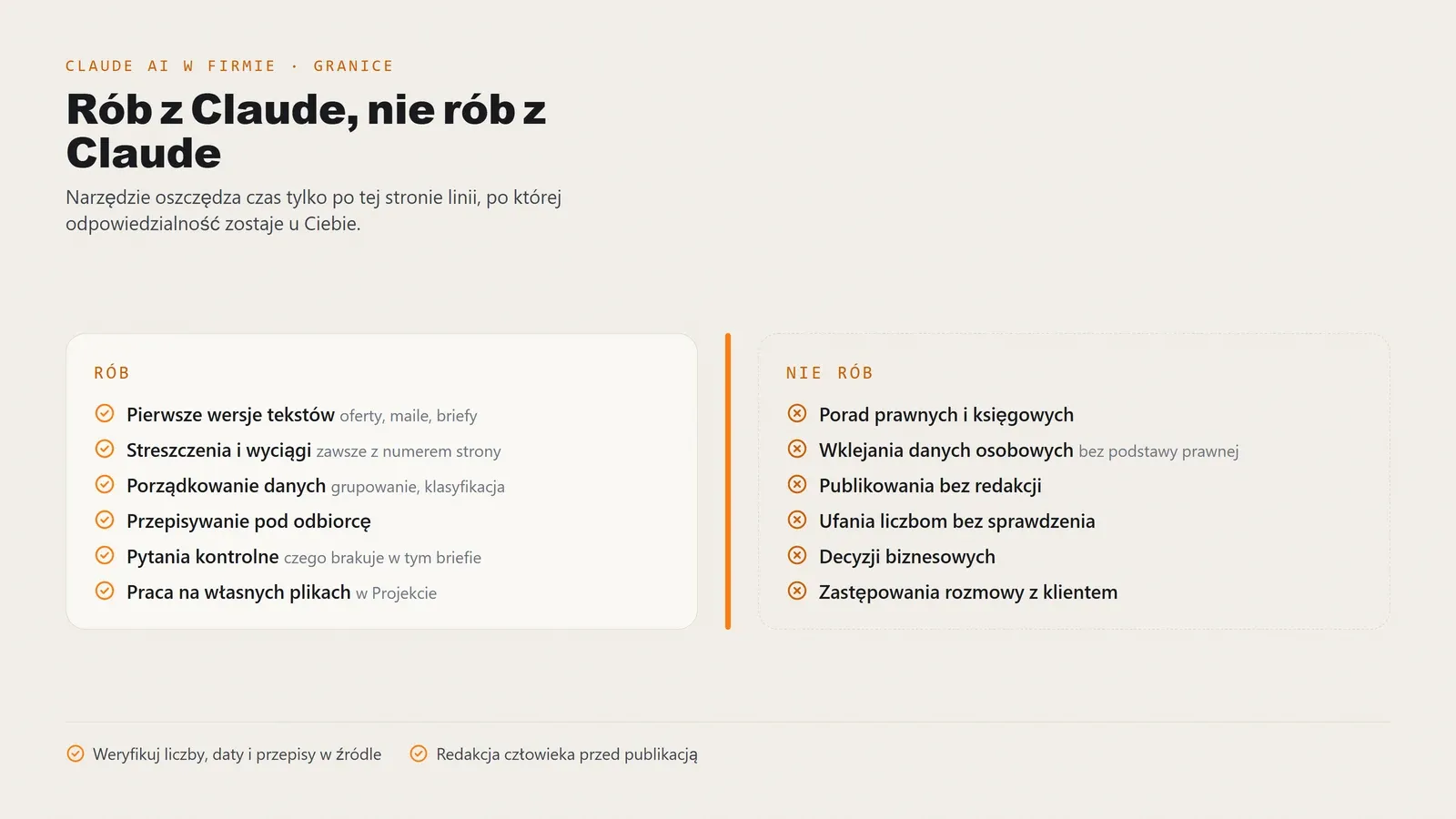
A distinction worth pinning above your desk
Use Claude for
- First drafts - proposals, descriptions, emails and briefs. Editing is faster than starting from scratch.
- Summaries and extracts - contracts, reports and transcripts. Always request page or clause numbers.
- Organising data - grouping, classification and turning notes into structure.
- Adapting text to an audience - the same message for a client, the board and social media.
- Checking questions - “what will they ask?”, “what is missing from this brief?”, “where is the gap in this plan?”.
- Your own files - using context you supply within a Project.
Do not use Claude for
- Legal and accounting advice - it can summarise a document but will not take responsibility for its interpretation.
- Uploading personal data - customer, applicant or employee data without a lawful basis and company rules.
- Publishing without editing - unedited output is noticeable, and Google treats mass production as spam.
- Trusting unchecked numbers - verify amounts, dates, percentages and legal references at the source.
- Business decisions - it does not know your costs, obligations or history. The decision remains yours.
- Replacing conversations with customers - no model can read what a customer says between the lines.
This list is not meant to discourage you. It sets boundaries that let the tool save time instead of costing time when you repair the consequences.
Claude and ChatGPT - comparison without a verdict
“Claude or ChatGPT?” comes up in every discussion of business AI. The answer depends on the task, and the differences are smaller than online comparison headlines suggest.
Both now provide the same basic functions: conversation, files, web search, business tool integrations, developer tools, and free and paid plans. It is not a matter of one doing something the other cannot do at all. Differences lie in style, usability and how each handles a particular kind of work.
What to base your choice on
Criterion
How to test it yourself
Ask both tools to write the same difficult email. Choose the one needing fewer edits before sending. That is the meaningful test.
Upload the same contract or report and ask five detailed questions about different parts. Count how often you need to correct the answer.
Both write Polish. Test your industry jargon: that is where literal translations appear and differences become visible.
Check whether the tool connects to your systems. For Claude, MCP is the standard.
If you have an IT team or maintain a website in-house, this criterion can decide the whole choice.
Compare business plan terms rather than consumer plans. That is where the differences lie, not in free versions.
Calculate the cost per person who actually uses it weekly, rather than the plan price alone. Usually that means half the team, not everyone.
The caveat this comparison needs
Both tools change every quarter: new models, features and pricing. A February ranking may be outdated by May. The reliable method is two weeks with each tool on your real tasks, deciding according to how often the output needed correcting.
Many businesses end up keeping both. Two subscriptions cost less than an hour of specialist work, and different tasks suit different tools.
What it costs and which plan makes sense for your business
Claude pricing has four tiers plus the API. The free plan limits conversations but lets you try it without a payment card. Pro costs around USD 20 per month and removes most restrictions felt in everyday work. Max plans offer higher limits to people using it for hours each day. Team and Enterprise add account administration, business billing and separate data handling terms.
Check current rates at the source: AI pricing changes several times a year and every figure in an article will eventually age.
A three-person company
Start free and upgrade one or two people who write the most to Pro. At this size, a business plan is a formality without a matching benefit. The actual cost is several dozen Polish złoty a month for a tool that saves hours. The return is visible in the first week, without needing a spreadsheet to calculate it.
A ten-person company
This is the first decision threshold. If people paste anything customer-related into chat, Team becomes a matter of compliance with data protection rules rather than convenience. Shared Projects with company instructions also give everyone results in the same tone instead of a different voice for each person.
Calculate the cost from the number of people who will use it at least weekly, not total headcount. In a ten-person company, that usually means four to six users.
A fifty-person company
Enterprise, or Team with firm internal rules. At this scale the issue becomes oversight rather than price: who has access, what may be uploaded, where the model’s responsibility ends and the employee’s begins. Without a written policy you get shadow AI: staff using personal accounts for company work. That is worse than having no tool.
The API also becomes relevant because recurring processes are cheaper to handle in code than manually in chat: classifying enquiries, generating descriptions and initial form handling.
A calculation to make before buying: count the hours your team spends drafting and summarising documents each month. Multiply by the hourly rate, then compare that figure with the plan price. If the result is unconvincing, the tool will not solve your problem and you need to look elsewhere.
For scale, our DigiDraft pricing lists agency rates for websites, campaigns and content. An AI subscription is a different magnitude and type of expense. One does not replace the other, as we explain below.
How to start in a week - day by day
The most common implementation mistake is buying licences for everyone and saying “use them”. A month later, two people use the tool and everyone else remembers trying it unsuccessfully. The following plan takes five working days and requires no approval beyond yours.
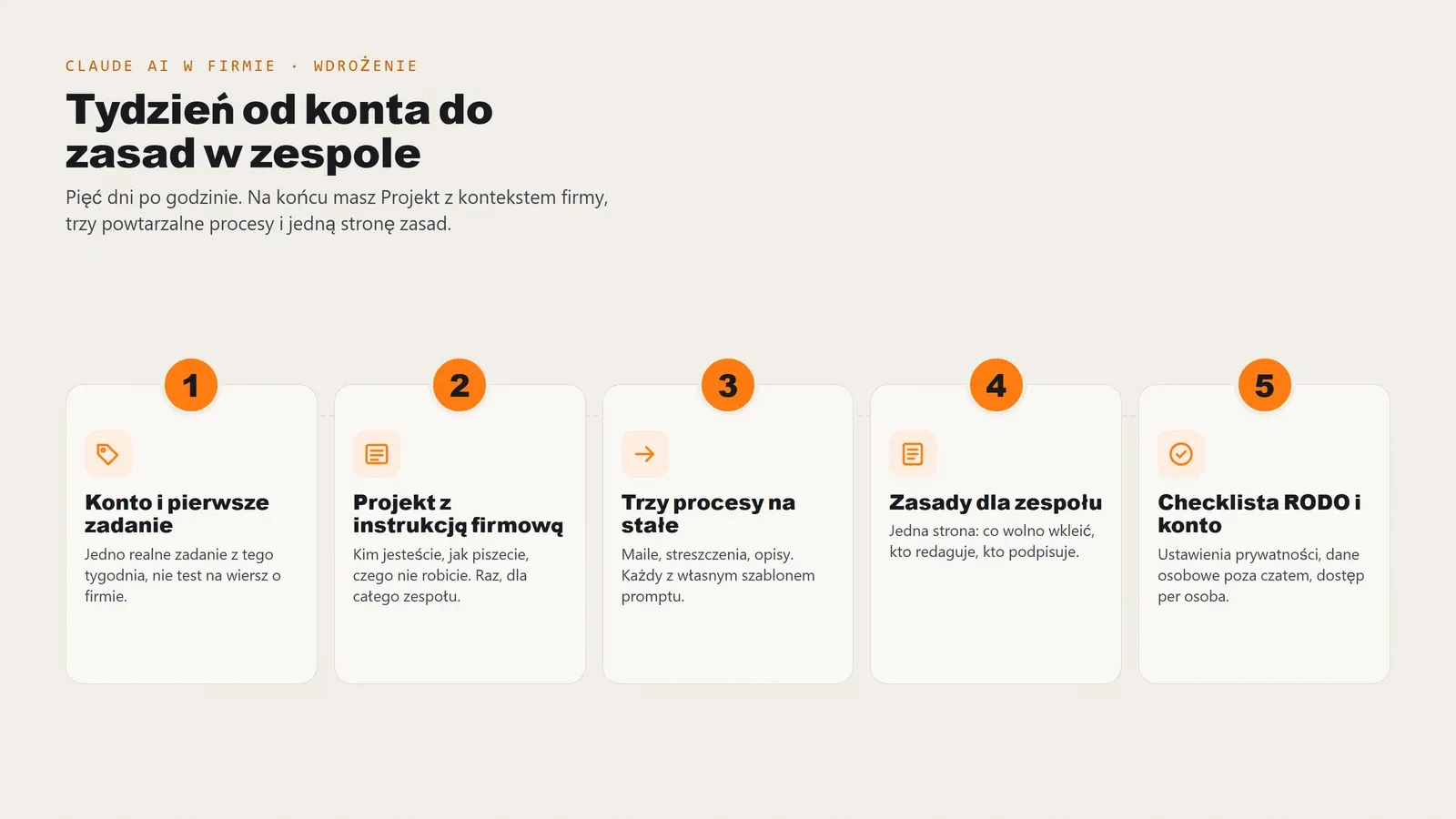
Day 1: an account and a real work task
Create an account and choose free or Pro. Then take a real task from today’s list, not an exercise: an email postponed for three days, a proposal to write or a report to summarise. The first experience should concern work rather than playing with questions about capital cities.
Day 2: a Project with company instructions
This step determines everything. Create a Project and upload the company description, services, prices, writing rules (what you do not say, your tone and words you avoid), and two or three examples of your best texts. Every conversation in the Project starts with that knowledge.
Without this step, everyone will explain the business to the model from scratch and get different results.
Day 3: three workflows to move permanently
Choose exactly three recurring tasks and move them into Claude permanently. Not ten: three. Typical successes are replies to common quotation requests, summaries of incoming documents and meeting notes.
Save a ready-to-use prompt for each in the Project so you do not reinvent it each time. A prompt that works is a company asset, like a proposal template.
Day 4: one page of team rules
A short document everyone will read: what may be uploaded, what may not, what must be verified before sending to a client and who signs off the content. One page. Nobody will read a longer one, and you need them to read it.
The minimum: no personal data without approval from the person responsible for GDPR; verification of every number and legal reference; a human signs the text and is responsible for its contents.
Day 5: GDPR checklist and account settings
The last day covers formalities. Check current account privacy settings, including conversation use for training. Decide whether your data calls for Team or Enterprise, where customer data is not used for training. Update your record of processing activities if you keep one. Record the decision in writing so nobody has to guess the basis for using the tool six months later.
Success after a week: three workflows run without reminders and the team knows what must not be uploaded. If nobody else has used the tool after five days, the problem is the lack of a specific task assigned to a specific person.
How we use Claude at DigiDraft
This section exists for one reason: it is easy to write about a tool you do not use. Here are details from our work on digidraft.pl, which is built and developed with Claude Code.
A repository with instructions, not a conversation from scratch
The project directory contains instructions: technology stack, CSS rules, prohibited practices, commands, and sources of truth for prices and design tokens. The model reads them at the start of each session instead of guessing how we work. It is the same principle as a Project in claude.ai, applied to code.
A project status file sits alongside it: completed work, backlog, decisions and reasons. After a week away, the conversation starts from the actual situation instead of reconstructing context.
Subagents: dividing work into roles
Claude Code can delegate tasks to subagents with separate instructions. We use four roles:
- SEO copywriter - writes and edits content, following prohibited-phrase and brand-voice rules. This article was created in that role.
- Frontend developer - implements components and styles according to an agreed plan, rather than designing independently.
- QA auditor - runs the quality gate before a commit and reviews changes for things tests passed but should not have.
- Status scribe - updates the project status file at the end of a session.
Each role has a model chosen for the task, because auditing and writing are different kinds of work with different costs.
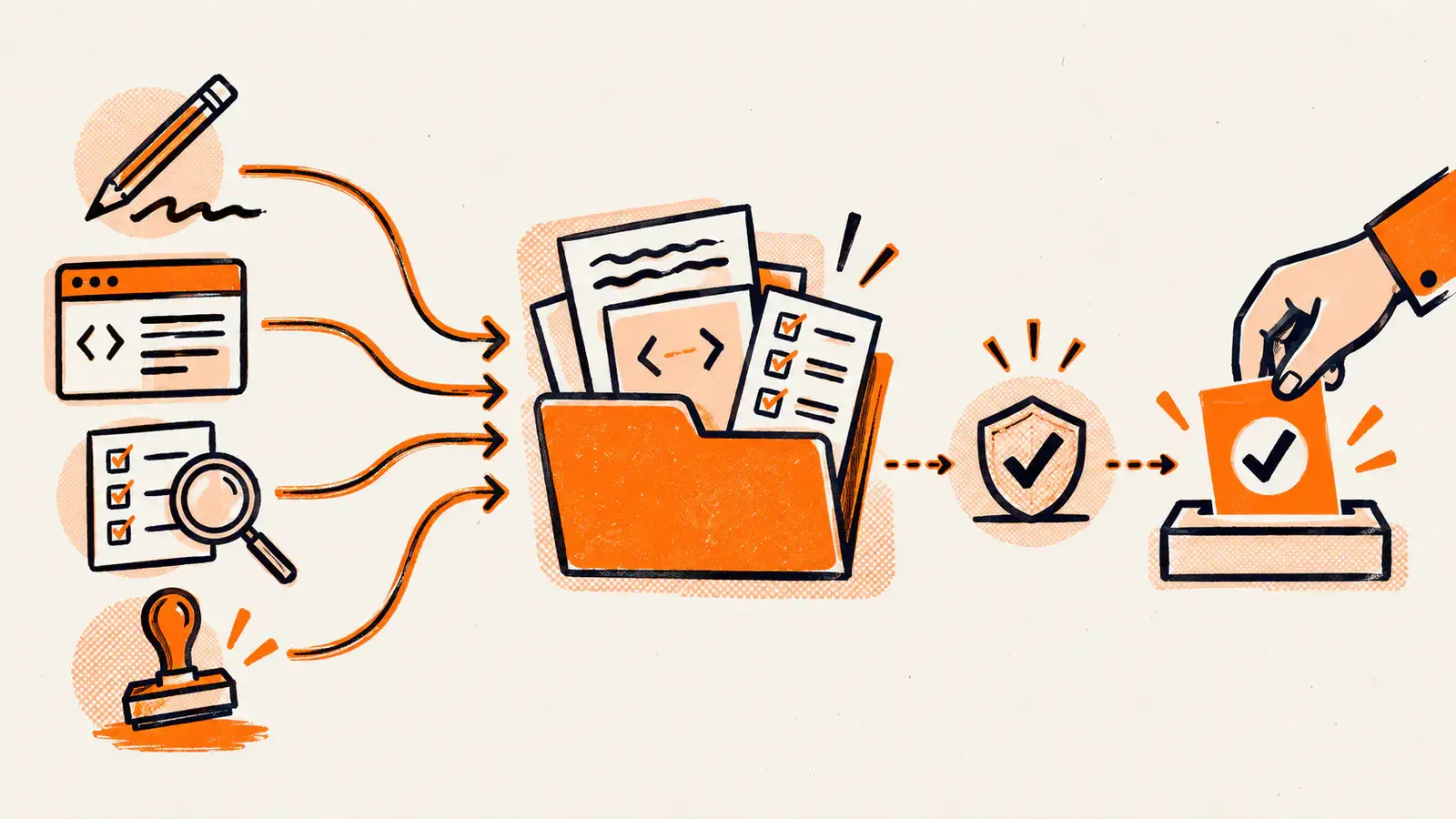
A quality gate instead of trust
No change proceeds without type checks, CSS convention checks, an accessibility scan of the built site and structured data validation. The result is binary: pass or fail. A script evaluates the work rather than the model itself.
We added another rule after our own mistakes: passing tests is not proof of correctness for changes spanning many files. Such changes need evidence that the rendered output is equivalent, plus a negative control proving the test can detect an error.
Hooks: rules that block writes
Documenting a rule is insufficient because models and people can miss it. Some rules are therefore enforced automatically, blocking an operation before it runs:
- No em dashes in new content: they are a recognisable model-writing habit, and our brand uses only short hyphens.
- No bulk Git staging or commits without explicit file paths. Parallel sessions share one index, and twice this ended with work overwriting other work.
- No access to files containing keys or sensitive configuration, enforced by tools rather than just written instructions.
- Automatic formatting after each save, avoiding time spent debating code style.
A rule in a document is a suggestion. A rule connected to a tool is a rule.
What the human does
All decisions: what to build and in which order, how the website should look, which version to deploy and when text is ready. Each page is approved before the next is created. A human commits changes, or explicitly asks the model to do so; the model never commits on its own initiative.
That last rule is deliberate. Committing to the repository makes the work a recorded fact, and the decision belongs to someone accountable for it.
What this means for your business
The pattern transfers to code and documents alike: persistent Project context instead of repeated explanations, roles instead of one universal prompt, quality control built into the process, and decisions and sign-off left to people.
We explain this division in agency work and each party’s responsibilities in our article on what a marketing agency does.
AI and SEO - can people tell a model wrote the text?
The question always comes in the same form: will Google penalise us for AI content? The answer is more practical than you might expect.
What Google says
Google assesses content by its usefulness to readers, not who wrote it. Using a tool is not penalised. Mass-producing unedited text to occupy search results rather than help readers is treated as spam.
The difference lies in editing, fact-checking and whether the text adds something absent from the first ten results.
Signs of model-written text
Unedited AI output has recognisable traces once you know what to look for:
- Uniform rhythm - successive sentences of similar length, without changes of pace or short sentences.
- Symmetry - equally long sections, lists of three everywhere and every paragraph ending with a conclusion.
- Filler phrases - “in today’s dynamic world”, “it is worth remembering”, “it should be noted”, “in conclusion”.
- Unsupported claims - “comprehensive solutions”, “a professional approach”, “fast delivery” without numbers, deadlines or examples.
- Lists replacing thought - lists where a paragraph would say more and show relationships.
- Echo headings - subheadings repeating the first sentence instead of introducing a new point.
- Long dashes where Polish writing would use a short hyphen or comma.
What editing must do
Vary the rhythm. Remove filler. Replace claims with specifics: a figure, date, name or example from work. Check every fact. Add what the model could not know: your experience and opinion.
Finally, the least-discussed point: the publisher is responsible for the content. The tool is not. If an article contains an incorrect legal or pricing claim, the company bears the consequences. In discussions of AI content, that is the argument that settles the issue.
Summary - what to put into practice tomorrow
Claude is a working tool. Its value comes from the repetitive work you delegate and the boundaries you set, rather than which model you choose.
Key takeaways
- Prompt quality matters more than model selection. Sonnet 5 with good context beats the strongest model with a one-sentence instruction.
- A Project with persistent company context is the cheapest way to improve results. An hour invested once saves time in every later conversation.
- Hallucinations are not a fault the next version will fix. They are a property of the tool, and fact-checking remains your responsibility.
- Decide how to handle personal data before the first upload. Check account privacy settings and choose a plan matching your data.
- Compare ChatGPT on your own tasks, not other people’s rankings. Both tools change every quarter.
- Human editing is required before publication. Google looks at usefulness; you remain responsible for the content.
What to do next
- Create an account and complete one real task from today’s list, rather than a test exercise.
- Build a Project with your company description, prices and writing rules. This is day two above and the biggest return of the week.
- Choose three permanent workflows and save ready-to-use prompts for them.
- Write one page of team rules before someone pastes a customer database into chat.
A tool will not turn an average business into a good one. It can make a good business faster, provided someone still reads what goes to the customer.
FAQ - common questions about Claude AI
Six questions that arise when clients discuss introducing AI: language, differences from ChatGPT, data, costs, recognisable AI writing and the boundary between a tool and an agency. Earlier sections cover each in more depth.
Does Claude speak Polish?
Yes. Claude understands and writes Polish without switching languages. Idioms, industry jargon and regional expressions can be a problem: sentences may be grammatically correct but sound translated. Any text going to a client or onto a website should therefore be edited by someone who knows the industry.
How does Claude differ from ChatGPT?
They are competing tools in the same category: conversation, working with files, web search, integrations and developer tools. Anthropic makes Claude; OpenAI makes ChatGPT. Differences concern response style, long-document workflows, features and pricing, rather than one tool being able to do something the other cannot do at all. Both change every quarter, so test comparisons on your own tasks.
Are Claude conversations used to train the model?
Consumer accounts have privacy settings for using conversations in training, which users can turn off. In Team and Enterprise plans and API access, customer data is not used for training. Before introducing Claude at work, check the current privacy settings in your account: that is the place showing the actual situation for your organisation.
How much does Claude AI cost?
There is a free plan with conversation limits, Pro at around USD 20 per month, Max plans with higher limits for daily users, and Team and Enterprise business plans with account administration and separate data handling terms. Developers can also pay for API usage. Check current prices on the Anthropic website, because AI pricing changes several times a year.
Can you tell that AI wrote a text, and does it hurt SEO?
Unedited model output is recognisable from its rhythm and filler phrases: uniform sentences, symmetrical lists, openings such as "in today’s dynamic world", and unsupported claims. Google assesses content by usefulness rather than authorship, but treats mass publication of unedited text as spam. Human editing is a requirement, not an option.
Will Claude replace a marketing agency?
It will not replace strategy, decisions or responsibility for results, because the model does not know your market, customers or company history until you provide them. It can replace much of the routine work: first drafts, summaries, rewriting and organising data. In practice, an agency with good AI working methods delivers faster, not less.
The most frequent question needs more than a paragraph: “where do we start with five people and no experience?”. Start with one process and one responsible person, rather than licences for everyone. Have another question? Email biuro@digidraft.pl; we reply within 24 business hours.